For many Android users, switching to an iPhone brings a mix of nostalgia and envy, especially when certain features come to mind. One such feature I often miss is the built-in Measure app on the iPhone, particularly its Level tool. Recently, I found myself mounting a TV and realized I needed a reliable way to check if the mounting frame was level, but I only had my Galaxy S26 Ultra on hand.
Finding the Right Leveling App
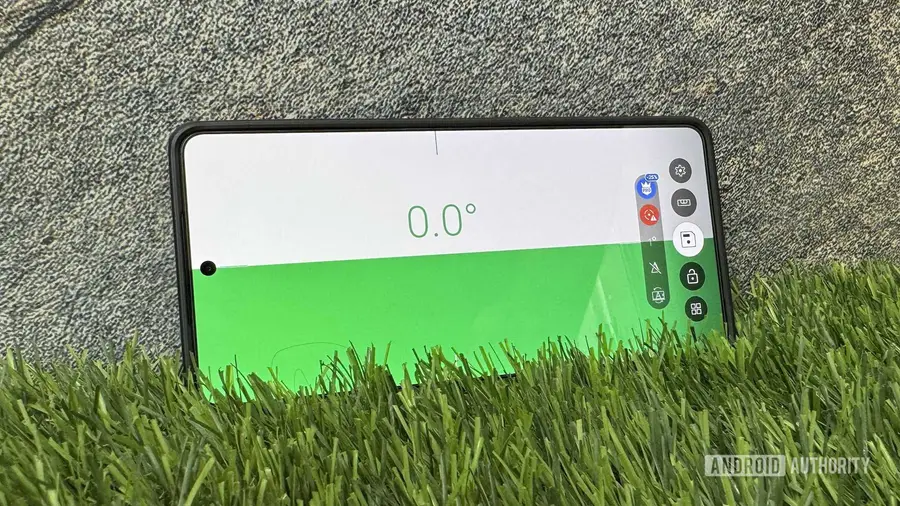
While the Galaxy S26 Ultra does come with a Surface Level tool in its Edge Panel, I found it somewhat limited for my specific task. The built-in tool is great for checking flat surfaces but fails to provide the detail needed for aligning a narrow frame. This led me to explore various leveling apps available for Android, ultimately discovering Bubble Level, which turned out to be the best option for my needs.
Why Choose Bubble Level?
After trying multiple free apps that were well-rated, Bubble Level distinguished itself for a few key reasons:
- No Ads: One of the most significant advantages is that the app is entirely ad-free. This feature ensures a smooth user experience—especially crucial when you’re focused on getting a task done without interruptions.
- Automatic Mode Selection: Bubble Level simplifies the process by automatically detecting the mode based on its placement. Unlike other apps that require manual adjustments, Bubble Level provides the necessary readings without any extra steps.
- Measurement Saving: The app allows users to save measurements easily. With a simple tap on the screen, you can freeze a reading and save it along with relevant details. However, bear in mind that the free version limits you to three saved measurements.
Using Bubble Level
To start using Bubble Level, simply download it from the Play Store and open it. You can either skip the introduction or take a quick tour. To check if a frame is level, place your phone on it along its edge. The app will automatically show the tilt angle, with a reading of 0.0 indicating a perfectly level surface. If it’s not level, you’ll see the angle of tilt, which helps in making adjustments.
Freezing and saving the reading is straightforward. Just tap and hold the screen, then hit the save icon if you wish to keep the measurement for future reference. You can label your saved data, delete it, or share it as needed.
Additional Features and Options
While Bubble Level is user-friendly, it also offers various settings to enhance functionality. You can manually select modes such as Flat, Level, Plumb, and Camera, depending on your needs. Calibration is also available to ensure accuracy, particularly if you notice irregular readings.
Furthermore, users can customize alerts, measurement units, and even keep the screen on during use. For those wanting more advanced features, upgrading to Bubble Pro unlocks additional capabilities.
Alternative Level Checking Methods
Interestingly, I discovered two other methods to check levels using an Android device. The first is Google's built-in level tool, accessible via the Google app or a web browser. This tool behaves similarly to Samsung's Surface Level, providing dual functionality for flat surfaces and straight edges.
The second method involves using the Camera app's level meter, which can be enabled in the settings. While these alternatives can be useful for quick checks, they don’t replace the dedicated features offered by Bubble Level.
In conclusion, if you’re seeking to replicate iPhone's leveling capabilities on your Galaxy phone, Bubble Level is a commendable choice. Its seamless functionality and user-friendly features make it an invaluable tool for anyone needing precise alignment.
Source: https://www.androidauthority.com/this-free-app-adds-one-of-my-favorite-iphone-features-to-my-galaxy-phone-3724833/