Google Changed My Favorite Pixel Feature, and I’m Very Upset
Introduction to the Pixel Screenshots Feature
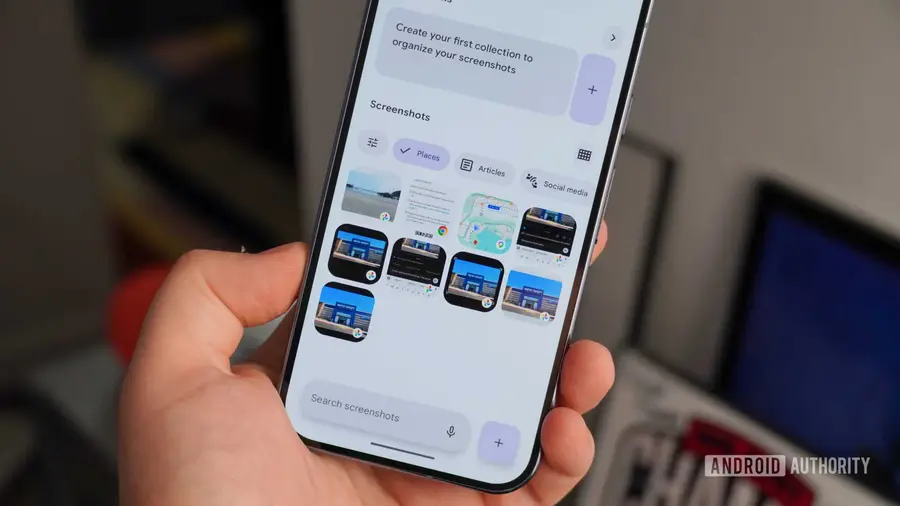
Google Pixel devices are known for exclusive features that set them apart from competitors, especially in software. With regular updates called Pixel Drops and Android OS support for up to seven years, Google Pixel offers a unique experience. One of the most notable features is Pixel Screenshots, an app designed to analyze and summarize screenshots using advanced AI models.
Disappointing Changes
However, I recently discovered that this app underwent significant changes without adequate notification. After the latest update, Pixel Screenshots, which previously processed data on-device, has now shifted to cloud processing. This feature, originally powered by the Gemini Nano model, is no longer as fast or as secure as before. I feel very frustrated because this change altered how I use the app.
Functionality and Practicality of Pixel Screenshots
Pixel Screenshots is indeed a polarizing app. Some people consider it unnecessary since Google Photos already has filtering functions for screenshots. But for me, who often takes screenshots and rarely revisits them, this app is very helpful. Features like screenshot category grouping, link extraction, and reminders to review certain screenshots make it a useful tool.
Previously, I never worried about the data processed by Pixel Screenshots, even when capturing sensitive information. All processing was done on my device, so my privacy was protected. However, with the latest update, I have to reconsider my data privacy and security.
Lack of Communication from Google
What’s even more disappointing is the lack of communication from Google about this change. I received no notification or pop-up explaining this shift; I only found out through an article on Android Authority. A simple explanation in the Play Store release notes could help users understand whether they still want to use Pixel Screenshots after the move to cloud processing.
Although cloud processing can reduce system load and enable more advanced features, I’m confused about what problem this change is actually trying to solve. Google Photos already has cloud-based AI that can answer questions about my screenshots. With cloud processing, I now have to be more cautious about my data privacy and security.
Possible Alternatives
This change doesn’t have to be controversial. If Google provided an additional option in Pixel Screenshots to choose between on-device and cloud processing, this update wouldn’t be an issue. Although Pixel Screenshots can still process data manually when the device is offline, users should be given a clear choice regarding their processing preferences.
Samsung has addressed this by adding a system-level option to disable cloud processing for all Galaxy AI features. I don’t understand why Google hasn’t adopted a similar approach. Currently, users have to look for settings within the app to disable sending screenshot data to the cloud, which is inconvenient.
Conclusion
With various performance and memory issues on Pixel devices, Google should consider expanding Pixel Screenshots access to more devices. If this feature now uses the cloud, it shouldn’t be limited to just Pixel 9 and Pixel 10 models. Users on older Pixel devices deserve the same access.
Ideally, I want as many AI features as possible to work locally on my device. It’s unfortunate that Pixel devices seem increasingly reliant on cloud processing rather than leveraging on-device capabilities. I hope Google improves communication and offers more options for users to protect their privacy.
Source: https://www.androidauthority.com/google-made-me-turn-off-pixel-screenshots-3680197/