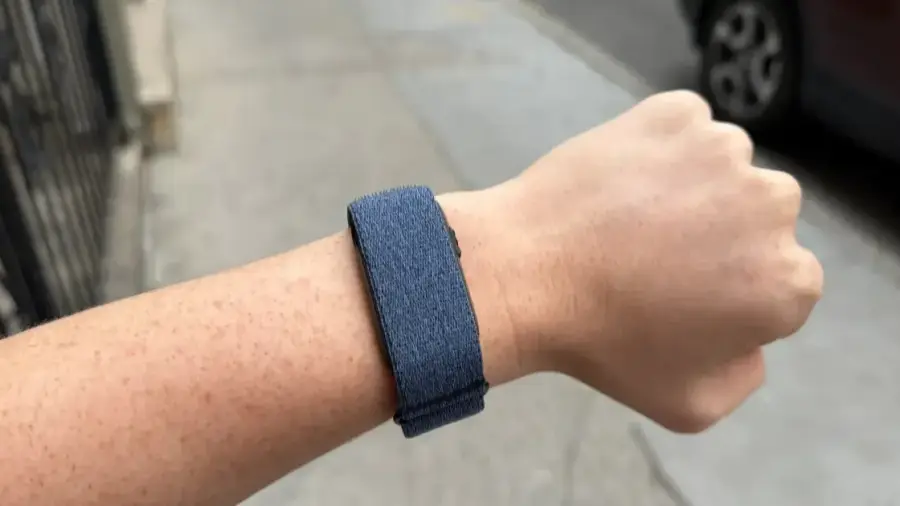
Garmin has launched the Cirqa, their first smart band without a display, designed to track fitness and health 24/7 without requiring a monthly subscription. For Garmin enthusiasts who want continuous data without wearing a bulky sports watch while sleeping, this $199 smart band is an appealing choice.
If you've just unboxed your Garmin Cirqa, there are several essential steps to ensure that the device operates optimally. This guide will assist users in setting up correctly and making the most of the available features.
Setting Up Your Garmin Cirqa
Users who already own Garmin watches like the Fenix or Forerunner can still keep those devices as their “Primary Training Device.” However, to receive continuous daily health metrics, the Cirqa should be designated as the “Primary Wearable.” If this step is overlooked during initial setup, here’s how to manage the device in the Garmin Connect app:
- Open the Garmin Connect app.
- Select the Cirqa device in the top right corner.
- Adjust settings to ensure recovery data, daily steps, and sleep information from Cirqa sync to your profile.
This setup prevents conflicts with your main sports watch during intense workouts.
Choosing the Right Size
The Cirqa fabric band comes in two sizes. The small/medium size fits wrist circumferences of approximately 120-200 mm, while the large/extra-large is suitable for 145-240 mm. It's crucial to find a comfortable yet snug fit to ensure the accuracy of the optical heart rate readings, so take the time to adjust the strap before relying on the displayed metrics.
Garmin also offers an upper-arm band separately for $49.99. If you prefer tracking from your upper arm instead of your wrist, this option is worth considering, especially during activities where the wristband might be cumbersome. The upper arm position can potentially enhance heart rate accuracy due to better contact with denser body parts and reduced wrist movement interference.
Understanding the Garmin Connect Insights
Initially, the insights within the Connect app may seem scattered and confusing. There’s no need to absorb all the information on the first day. The Cirqa can track training readiness, HRV status, VO2 max, heart rate, Pulse Ox, stress levels, and sleep tracking. In the sleep tracking feature, users can view sleep stages, naps, and personalized coaching that complement the basic sleep score.
This smartwatch includes built-in glances, but users can customize these based on their fitness goals. Some users find Garmin's Body Battery too simplistic and unhelpful. Instead, the Running Economy glance can replace Body Battery to monitor performance improvements as running volume and intensity increase.
Advanced Features and Lifestyle Tools
If needed, this is also the perfect time to set up women’s health tracking. The Cirqa estimates period predictions and past ovulation windows using skin temperature data collected during sleep. This data can sync with the Natural Cycles contraceptive app, which requires a separate subscription.
Keep in mind that richer insights like training readiness trends or sleep coaching may take several days or weeks of data to become meaningful. Allow one to two weeks of normal usage before assessing the information provided by the device.
Compared to other smart bands, the on-device button on the Cirqa stands out. It can track over 80 activities such as running, yoga, and cycling, whether initiated with a button press or through the Garmin Connect app. While automatic activity detection is claimed to be available, its reliability remains questionable.
To optimize this feature, users should specify the types of activities they want to start and stop with a quick button press. Open the Garmin Connect app, select Cirqa in the top right corner, then go to Activity Options > Edit (top right) > Select favorite activities. Pressing the button on the Cirqa will then immediately start your chosen activity.
When exercising outdoors, remember that the Cirqa connects to your phone’s GPS for accurate location tracking. The Cirqa itself lacks an internal GPS receiver like most smart bands, so carry your phone if you wish to record routes accurately.
In addition to primary fitness and sleep features, the Cirqa includes several lifestyle tools worth trying. The app features a Jet Lag Adviser, lifestyle and journal logging, hydration and calorie tracking, daily step counting, and intensity minutes. There’s also a wheelchair mode for push tracking based on wrist movement.
Overall, taking the time to familiarize yourself with the Garmin Connect app is highly recommended. Since the Cirqa has no display, users will need to know where to find each insight within the app. As this smart band is still in its early launch phase, the app should be checked regularly for firmware updates.
By following this setup guide, Garmin Cirqa users can immediately benefit from all the features of this innovative smart band without a screen. The combination of 24-hour health tracking, no subscription fees, and a price point of $199 makes it an attractive option for those seeking comprehensive data without distractions.
Source: https://telset.id/how-to/cara-setup-garmin-cirqa-panduan-lengkap-smart-band-tanpa-layar