Android Auto telah menjadi salah satu fitur yang banyak digunakan oleh pengendara modern. Meskipun pada awalnya kita hanya melihatnya sebagai sistem navigasi dan pengontrol media, ada lebih banyak hal yang bisa dilakukan Android Auto. Dalam artikel ini, kita akan membahas cara menginstal aplikasi pihak ketiga di Android Auto, membuka lebih banyak kemungkinan untuk pengalaman berkendara Anda.
Pengenalan Android Auto
Banyak pengguna Android Auto hanya menggunakan aplikasi yang disediakan Google, seperti Google Maps, Spotify, dan YouTube Music. Namun, ada kalanya kita ingin melakukan lebih dari sekadar mendengarkan musik atau melihat peta. Misalnya, bagaimana jika Anda ingin menonton video saat terjebak di kemacetan? Di sinilah fitur menyenangkan dari Android Auto muncul.
Langkah-langkah Menginstal Aplikasi Pihak Ketiga
Proses untuk menginstal aplikasi pihak ketiga di Android Auto sebenarnya cukup sederhana dan tidak memerlukan akses root pada ponsel Anda. Berikut adalah langkah-langkah yang perlu Anda ikuti:
- Aktifkan Mode Pengembang: Masuk ke aplikasi Pengaturan, kemudian buka bagian Tentang. Ketuk nomor build sebanyak tujuh kali untuk mengaktifkan Mode Pengembang.
- Izinkan Instalasi dari Sumber Tidak Dikenal: Setelah Mode Pengembang aktif, pergi ke Pengaturan dan pilih Aplikasi, lalu pilih Android Auto. Di halaman info aplikasi, ketuk pengaturan tambahan dan ketuk bagian versi dan izin sepuluh kali.
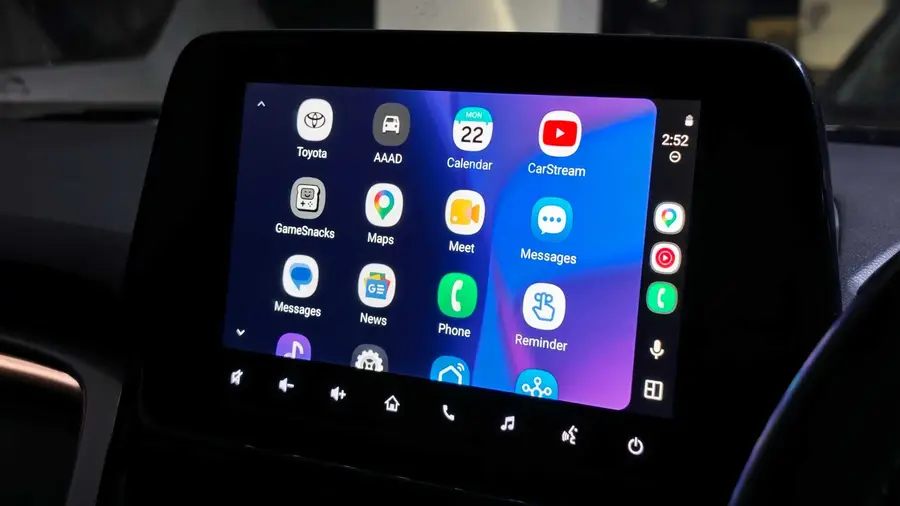
- Instal Aplikasi Android Auto Apps Downloader (AAAD): Ini adalah aplikasi yang memungkinkan Anda mengunduh aplikasi pihak ketiga untuk Android Auto. Unduh APK dari halaman rilis pengembang di GitHub dan instal secara manual.
Rekomendasi Aplikasi Pihak Ketiga
Setelah Anda menginstal AAAD, Anda akan memiliki akses ke berbagai aplikasi pihak ketiga yang dapat meningkatkan pengalaman berkendara Anda. Beberapa aplikasi yang direkomendasikan antara lain:
- CarStream: Aplikasi ini memungkinkan Anda menonton video YouTube di layar mobil Anda, bahkan saat mobil sedang bergerak (meskipun sebaiknya tidak dilakukan saat berkendara).
- AAMirror: Aplikasi ini memungkinkan Anda mencerminkan layar ponsel Android ke dashboard mobil, sangat berguna untuk memutar video atau konten dari browser.
- Fermata Auto: Aplikasi multimedia lengkap yang mendukung streaming video, memutar video lokal, dan akses ke layanan seperti Netflix dan Prime Video langsung di layar mobil.
Apakah Menginstal Aplikasi Pihak Ketiga Aman?
Meski proses ini menarik, penting untuk mempertimbangkan risiko dan manfaatnya. Google membatasi aplikasi yang dapat diinstal di Android Auto karena alasan keselamatan. Menggunakan aplikasi yang dapat mengalihkan perhatian saat berkendara bisa sangat berbahaya. Bagi kebanyakan orang, menggunakan Android Auto sesuai dengan tujuan awalnya—navigasi, musik, dan komunikasi—sudah lebih dari cukup.
Selain itu, Google secara rutin memperbarui Android Auto untuk menutup celah yang memungkinkan pemasangan aplikasi pihak ketiga. Jadi, meskipun Anda membeli AAAD, ada kemungkinan aplikasi tersebut tidak akan bertahan lama.
Kesimpulannya, meskipun menginstal aplikasi pihak ketiga di Android Auto mungkin terdengar menarik, sebaiknya dilakukan dengan hati-hati. Bagi sebagian besar pengguna, tetap menggunakan fitur dasar Android Auto sudah lebih dari cukup untuk pengalaman berkendara yang aman dan nyaman.
Sumber: https://www.androidauthority.com/sideload-apps-android-auto-hidden-feature-3681820/