Membangun rumah pintar yang ideal sering kali terasa seperti perjuangan tanpa akhir melawan aplikasi yang terfragmentasi dan koneksi cloud yang tidak dapat diandalkan. Banyak orang, termasuk saya, sebelumnya mengandalkan Google Home dan Amazon Echo untuk mengelola lampu pintar dan colokan, namun pengalaman tersebut selalu terasa lambat dan canggung.
Pindah ke Home Assistant
Perubahan terjadi ketika saya memutuskan untuk memigrasi seluruh sistem rumah saya ke Home Assistant, sebuah platform rumah pintar yang dikendalikan secara lokal, dengan fokus pada privasi dan kustomisasi. Meskipun perangkat lunaknya berjalan di server kecil di meja saya, yang membuat semuanya berjalan dengan baik adalah sesuatu yang berbeda.
Pixel Sebagai Teman Terbaik
Pixel saya telah menjadi teman terbaik untuk pengaturan rumah pintar saya, berfungsi sebagai pemicu yang sangat cakap untuk otomatisasi di seluruh rumah. Salah satu tantangan terbesar dalam pengaturan rumah pintar adalah deteksi kehadiran, yang memberi tahu rumah apakah saya benar-benar ada di rumah atau tidak. Sebelumnya, saya mencoba berbagai aplikasi pihak ketiga dan bahkan beacon BLE, tetapi semuanya menguras baterai ponsel saya atau tidak cukup andal.
Saya menginginkan cara yang mudah untuk memastikan lampu menyala saat saya memasuki jalan masuk rumah, tanpa harus menjalankan kabel untuk sensor gerak. Integrasi Home Assistant di Pixel saya sepenuhnya menghilangkan frustrasi ini dengan menawarkan pelacakan lokasi latar belakang yang akurat dan hemat baterai. Sistem ini menggunakan kombinasi geofencing GPS biasa dan status koneksi Wi-Fi lokal untuk menentukan lokasi saya dengan tepat.
Otomatisasi yang Mudah
Begitu Pixel saya terputus dari jaringan Wi-Fi rumah dan melewati batas yang ditentukan, rumah secara otomatis masuk ke mode pergi. Purifier udara di ruang kerja saya mati, begitu juga lampu dan sistem keamanan diaktifkan. Ketika saya kembali ke rumah, prosesnya berbalik secara mulus. Saya bahkan telah mengatur otomatisasi untuk memeriksa waktu dan menyalakan lampu ketika saya kembali ke rumah jika sudah gelap. Semua ini berlangsung tanpa memerlukan interaksi dari saya.
Manfaat Data Perangkat
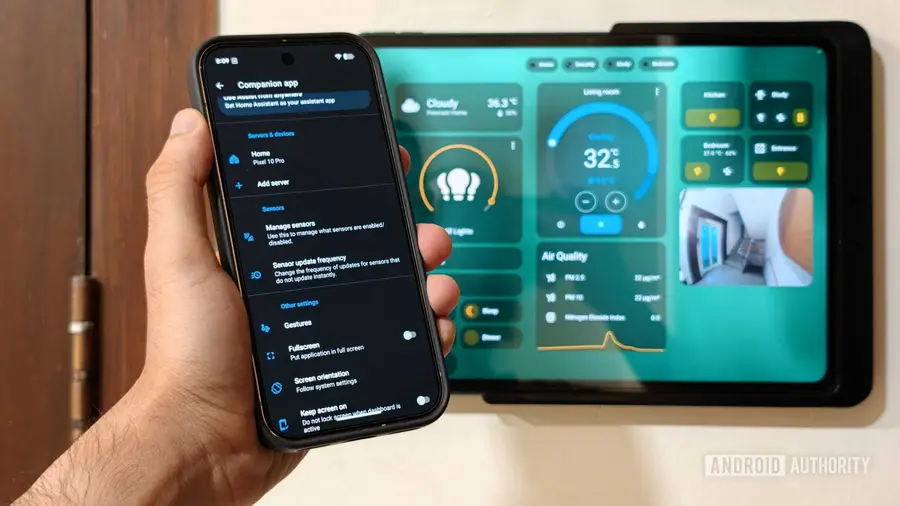
Yang benar-benar membedakan pengalaman Home Assistant dari platform dasar seperti Google Home atau Apple Home adalah jumlah data perangkat internal yang bisa Anda bagikan dengan server. Aplikasi mobile mengungkapkan puluhan sensor perangkat dari Pixel saya langsung ke dasbor rumah pintar saya. Ini mencakup segala hal mulai dari persentase baterai saat ini hingga orientasi perangkat. Alih-alih hanya menggunakan ponsel untuk mengontrol lampu, kondisi fisik ponsel menjadi pemicu untuk otomatisasi rumah yang kompleks.
Otomatisasi favorit saya adalah yang mengatur rutinitas tidur malam saya, sepenuhnya bergantung pada sensor pengisian daya ponsel saya. Setiap malam setelah jam 10 malam, saat saya meletakkan Pixel di pengisi daya samping tempat tidur, Home Assistant langsung mendeteksi perubahan keadaan dari pengisian daya menjadi pengisian nirkabel. Aksi ini memicu serangkaian peristiwa di seluruh rumah saya. Semua elektronik yang tidak penting dimatikan, speaker mulai memutar suara putih, dan sistem keamanan diaktifkan, semua tanpa perlu berdebat dengan Google Home.
Tentu saja, bahkan sistem otomatis terbaik tidak selalu sempurna. Ada kalanya Anda ingin menyalakan kipas tertentu atau menyalakan lampu tanpa menunggu pemicu otomatis aktif. Di sinilah Android, secara umum—dan Pixel saya, khususnya—bersinar, memungkinkan Anda membawa kontrol rumah pintar yang paling penting langsung ke antarmuka. Saya sangat bergantung pada kombinasi ubin Pengaturan Cepat kustom dan widget layar beranda interaktif untuk mengelola rumah saya dengan sedikit gesekan.
Dengan menggesek ke bawah dari bagian atas layar, saya dapat dengan cepat mengakses bayangan Pengaturan Cepat, di mana saya telah memetakan ubin khusus untuk tindakan rumah tangga paling sering saya lakukan. Saya memiliki ubin yang didedikasikan untuk mengatur suasana tertentu di kamar tidur saat menonton TV. Ubin lainnya memungkinkan saya untuk langsung menghidupkan atau mematikan kipas langit-langit di kantor.
Dengan proyek ini, saya awalnya ingin mengurangi ketergantungan pada perangkat lain dalam pengaturan rumah pintar saya. Namun, pengalaman ini menunjukkan bahwa kekuatan sejati dari rumah pintar terletak pada kemampuan perangkat untuk saling berkomunikasi. Integrasi antara Pixel saya dan Home Assistant telah mengubah sekumpulan gadget pintar yang terisolasi menjadi jaringan pemicu dan saklar yang kohesif.
Kesimpulan
Kecantikan dari ekosistem terbuka ini adalah bahwa Anda tidak perlu memiliki perangkat tertentu untuk mencapai hasil yang sama. Setiap ponsel Android modern yang menjalankan aplikasi pendamping Home Assistant dapat memanfaatkan sensor latar belakang dan alat akses cepat yang sama untuk membangun lingkungan otomatis yang sangat dipersonalisasi. Ini menghemat waktu, mengurangi gesekan harian, dan membuat rumah otomatis saya bekerja seperti perpaduan sempurna antara sistem proaktif dan reaktif yang saya cari. Semua yang saya butuhkan hanyalah menghubungkan Pixel saya dengan rumah pintar saya.
Sumber: https://www.androidauthority.com/pixel-home-assistant-smart-home-companion-3684122/