Recently, amidst the buzz surrounding the Pixel 11 launch, Google quietly introduced Android 17 QPR2 Beta 3. While many may have overlooked this update, it contains some noteworthy enhancements that could significantly improve the Pixel experience.
Enhanced Quick Settings Customization
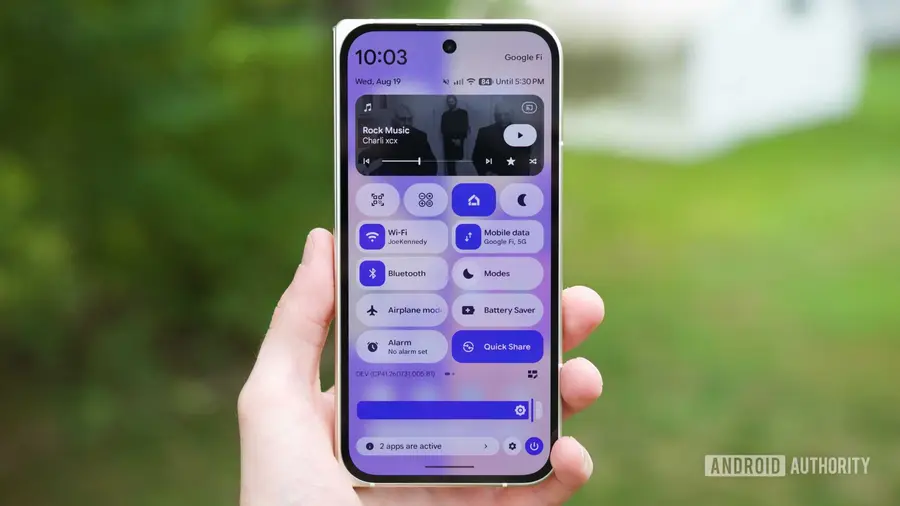
One of the standout features in Android 17 QPR2 Beta 3 is the revamped Quick Settings layout. Previously, users could only modify which toggles appeared in the Quick Settings panel, but now they can rearrange the entire layout. By swiping down and tapping the edit icon, users will find a new "Layout" button that leads to an "Edit tiles" page.
- Customize the position of brightness sliders and media players.
- Place shortcut toggles in the order that suits you best.
- Enjoy a more user-friendly interface tailored to your preferences.
This flexibility is particularly useful for those who prefer their brightness slider at the bottom for easier accessibility with one hand.
Dynamic Color Theming Improvements
Another exciting enhancement is the update to Dynamic Color theming. Previously, users could only select from a limited set of preset colors based on their wallpaper. With Android 17 QPR2 Beta 3, Google has introduced new customization options that allow for greater personalization.
- Choose from the original preset colors or new variations: Neutral, Soft, Bright, and Bold.
- Use the new paint palette icon to create a custom color using a slider.
- Enjoy a more personalized aesthetic that matches your unique style.
This increased flexibility in color choices is a welcome change for customization enthusiasts.
Introducing App Lock for Added Security
Initially underestimated, the new App Lock feature in Android 17 QPR2 Beta 3 is proving to be a valuable addition. This feature allows users to secure specific applications on their device, which can be especially useful for shopping or social media apps.
- Simply press and hold the app you wish to lock, select the "App lock" option, and add your desired apps.
- Provides an extra layer of security to prevent unauthorized access.
- Helps manage notifications by silencing them for locked apps.
For users concerned about privacy or wanting to limit distractions from certain apps, this feature offers an effective solution.
How to Access the Beta
If you're eager to try out these new features on your Pixel device, you can easily download Android 17 QPR2 Beta 3. Visit the Android Beta for Pixel website, sign in with your Google account, enroll your device, and download the OTA update. This beta is available for Pixel 6a and newer models.
For those who prefer a stable experience, the full release of Android 17 QPR2 is expected in December, likely offering even more features beyond what is available in the beta version.
In conclusion, Android 17 QPR2 Beta 3 introduces several exciting features that enhance usability and personalization for Pixel users. From customizable Quick Settings to advanced color theming and App Lock, there's much to explore in this update.
Source: https://www.androidauthority.com/android-17-qpr2-beta-3-hands-on-3700096/